~nvim.

Neovim Config

A terminal-first config built on LazyVim, designed to pair seamlessly with Claude Code and GitHub Copilot for AI-assisted development.

$git clone https://github.com/volskaya/neovim-config.git ~/.config/nvim

Open Neovim — plugins install automatically. Restart once to finalize.

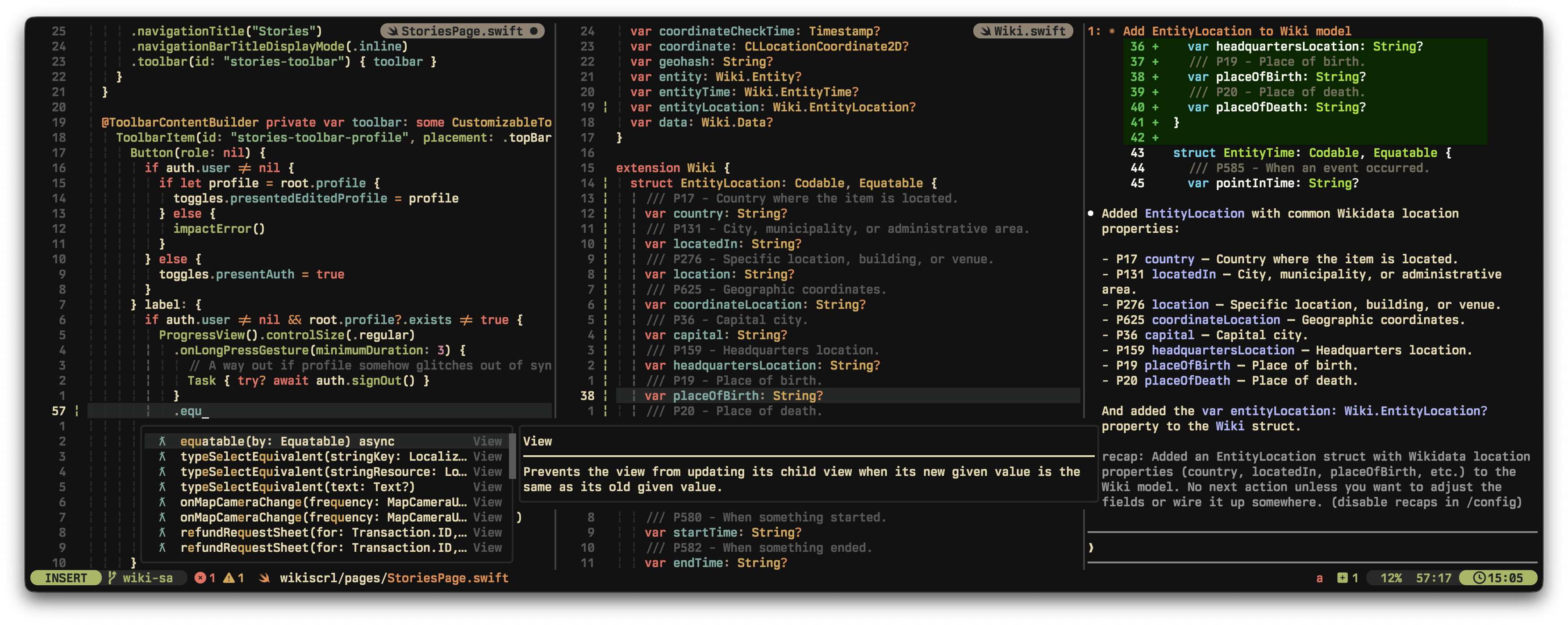
Neovim config preview
85+Plugins
20+Languages
16Colorschemes
200+Keybindings
// features

Everything You Need

AI-first editing, seamless navigation, and deep language support out of the box.

Claude Code

<leader>a

Runs side by side with your code as just another split, reading buffers and proposing inline diffs.

Copilot Ghost Text

Inline suggestions that blend into the regular completion flow.

Copilot Chat

<leader>p

Lightweight alternative to Claude Code for quick explanations, reviews, and fixes.

Per-Split Buffers

<leader>b

Each split remembers its own buffer stack, like VSCode tabs.

Filesystem Editing

<leader>e

Browse and rename files as text with Oil.nvim.

Git UI

<leader>gg

Stage, commit, and manage branches without leaving the editor.

Seamless Navigation

Meta+hjkl moves across Neovim splits and Wezterm/Tmux panes.

Multicursors

Add cursors with Meta+Shift+j/k, select next match with Meta+d.

Flash Motions

s / S

Jump to any visible text or treesitter node instantly.

Fuzzy Finder

<leader>f

Files, symbols, LSP pickers, and UI select powered by snacks.nvim.

Search & Replace

<leader>r

Live multi-file find and replace with grug-far.

LSP Out of the Box

Inlay hints, code actions, rename, references, and diagnostics pre-configured per language.

// built for

Real Workflows

Not just a dotfile dump. This config is built around specific development workflows.

iOS & macOS Development Without XcodeProjects need to be configured with XcodeGen and xcodebuild for building outside of Xcode.

Full Swift LSP via sourcekit-lsp with diagnostics, code actions, and go-to-definition. Build, run, and debug iOS and macOS apps from your terminal without ever opening Xcode.

AI-Assisted Development

Claude Code runs as a side-by-side split, reading your buffers and proposing inline diffs. GitHub Copilot provides ghost text completions and a chat panel for explanations, reviews, and fixes.

Flutter & Cross-Platform Mobile

Dart LSP with flutter-tools.nvim for hot reload, device selection, and widget inspection. A complete Flutter IDE experience inside Neovim.

Web & Full-Stack TypeScript

vtsls for fast TypeScript intellisense, ESLint integration, Prettier formatting, auto-organize imports on save, and Tailwind CSS completions. Everything a modern web project needs.

Rust Systems Programming

rust-analyzer with inlay hints, crate management via crates.nvim, and rustaceanvim for enhanced Rust tooling. Cargo integration built in.

Android & Kotlin Development

Kotlin LSP via LazyVim extra with Java treesitter support. Navigate, refactor, and build Android projects from your terminal alongside your existing Gradle workflow.

// languages

Polyglot by Default

Full LSP, formatting, linting, and treesitter support.

LanguageLSPExtras
TypeScriptvtslsESLint, Prettier
Rustrust-analyzer
Swiftsourcekit-lspXcode-free workflow
Dart / Flutterdartlsflutter-tools.nvim
Pythonpylsp
Lualua_lsstylua, selene
C / C++clangd
Gotreesitter
KotlinLazyVim extra
PHPLazyVim extraPrettier
GDScriptgodot-neovim
HTML / CSShtml, csslsTailwind CSS
ZigLazyVim extra
JSON / YAMLjsonls, yamlls
// colorschemes

16 Themes Included

Switch between all installed themes with <leader>uC. Transparent background supported.

catppuccindefault
irrelevantcustom
tokyodark
vesper
dracula
moonfly
mellifluous
kanagawa-paper
monokai-pro
evergarden
monoglow
gruvbox-material
miasma
everforest
oxocarbon
rose-pine
// keymaps

200+ Keybindings

Leader is Space. Keymaps marked with Cmd duplicate an Alt binding for non-Mac keyboards.

Navigation

{ / }Prev / next file (windovigation)
Ctrl+h/j/k/lMove to window (smart-splits)
Alt+h/j/k/lMove to window (smart-splits)
Shift+L / HNext / prev tab
Alt+tNew tab
Alt+wClose window

Flash (Jump)

sFlash jump
SFlash treesitter
Shift+sFlash backwards
rRemote flash
RTreesitter search
Ctrl+sToggle flash in search

Pickers & Explorer

<leader><leader>Find files
<leader>/Grep
<leader>b/Buffers
<leader>c/LSP configs
<leader>eOil (cwd)
<leader>EOil (project root)

Search & Replace

<leader>rReplace word under cursor (grug-far)
<leader>cRSearch & replace (empty)
<leader>crLSP rename
Alt+nClear search highlight

Editing

Ctrl+eJump to end of line
Alt+/Toggle comment
Alt+aSelect all
Ctrl+a / xIncrement / decrement number
<leader>cDGenerate doc comment

Multicursor

Alt+Shift+j/kAdd cursor below / above
Alt+dAdd cursor at next match
Alt+Shift+dSkip next match
Alt+uPrevious match
Alt+Shift+pToggle cursor
<leader>xDelete current cursor

LSP

Alt+.Code action
Alt+Shift+.Source action
<leader>iToggle inlay hints
Alt+Shift+oOrganize imports & save
Alt+Shift+iAdd missing imports
<leader>csSymbols outline

Claude Code

<leader>AOpen Claude Code
<leader>aContinue Claude Code
<leader>sSend selection to Claude
<leader>ooToggle Claude
<leader>omSelect Claude model
<leader>oa / odAccept / deny diff

Copilot Chat

<leader>cpChat with Copilot
<leader>ppToggle chat panel
<leader>peExplain
<leader>prReview
<leader>ptGenerate tests
<leader>pfFix

Git

<leader>gbGit blame
<leader>goOpen in browser
]t / [tNext / prev todo
<leader>xtTodos in Trouble

Files & Session

<leader>fsSave file
Ctrl+qQuit
<leader>tTerminal (cwd)
<leader>TTerminal (root)
<leader>zZen mode